

Add a talking AI mascot to your website with Wixzel Voice
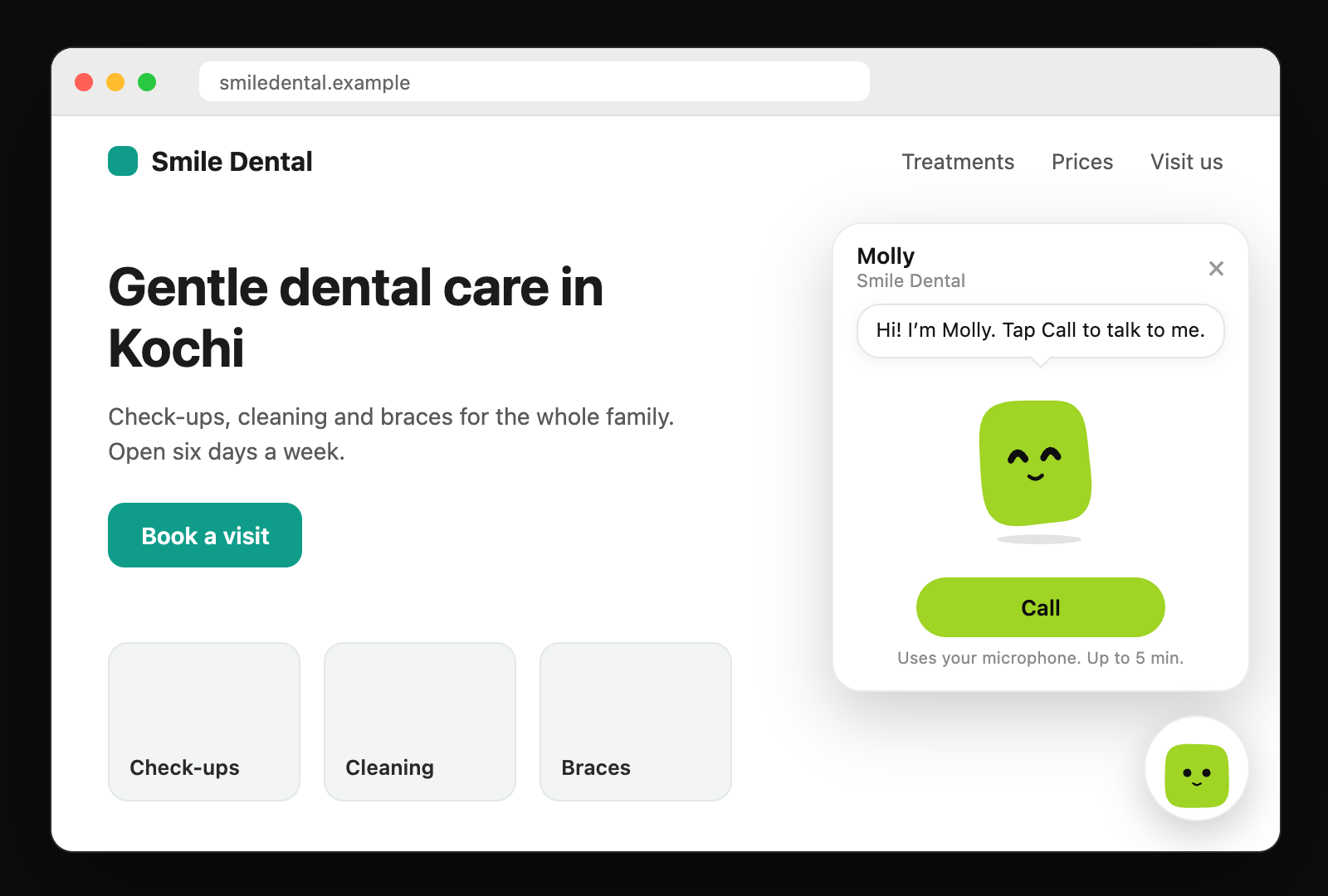
At the end of this guide your website has a talking mascot in the corner. Visitors tap Call and talk to an agent that knows your business, in the browser, with no phone line and no app. It takes about 15 minutes: one request makes the agent and its mascot from your site, one turns on the widget, and one script tag puts it on the page. Making the agent is not charged. Calls are billed per second like a call on the same engine: $0.0491 per connected minute on Gemini Live, about $0.15 for a three-minute conversation, from a prepaid balance.
By Aqeel Shamsudheen · Published · Updated
- Takes
- About 15 minutes
- Engine
- gemini-live
- Engine time
- $0.0491 per connected minute
What do you need before you start?
- A Wixzel Voice account with credit. Calls through the widget are paid from real credit, not the free test minutes; the minimum top-up is $5.
- An API key with the
agents:writeandcalls:writescopes, kept on your server. Everything below can also be done in the console, on the agent's Mascot tab. - A website served over HTTPS where you can add a script tag. Browsers only give a page the microphone over HTTPS.
How do you build this on Wixzel Voice, step by step?
01Make the agent from your website
Give it your site and a role.
roleisreceptionist,support,sales,guideor your own words:shellcurl https://api.voice.wixzel.com/v1/agents/generate \ -H "Authorization: Bearer $WIXZEL_API_KEY" \ -H "Content-Type: application/json" \ -d '{ "website_url": "https://smiledental.example", "role": "receptionist" }'make-agent.mjs (TypeScript SDK)import { WixzelVoice, waitForAgent } from 'wixzel-voice'; const client = new WixzelVoice({ apiKey: process.env.WIXZEL_API_KEY }); let agent = await client.agents.generate({ website_url: 'https://smiledental.example', role: 'receptionist', }); agent = await waitForAgent(client.agents, agent); // until the mascot is ready or failed console.log(agent.id, agent.name, agent.mascot.status, agent.knowledge_base_id);It answers at once with an agent that can already talk, and
mascot.status: "building". In the background it reads your pages, writes the prompt and opening line, builds a knowledge base from what it read, and draws a mascot in your brand colour. PollGET /v1/agents/{id}untilmascot.statusisready, usually in under a minute; in the SDK,waitForAgentdoes the polling. A failed build leaves the agent working with the look it had.The agent starts on Gemini Live. Change its engine, voice or prompt like any other agent with
PATCH /v1/agents/{id}; its mascot stays as it is.02Turn on the widget, and choose who can call
Sharing is off until you turn it on. List the origins your site is served from; the widget will not start a call anywhere else:
shellcurl -X PATCH https://api.voice.wixzel.com/v1/agents/AGENT_ID/mascot \ -H "Authorization: Bearer $WIXZEL_API_KEY" \ -H "Content-Type: application/json" \ -d '{ "welcome_message": "Hi! I am Molly from Smile Dental. Tap Call to talk to me.", "sharing": { "embed": true, "embed_origins": ["https://smiledental.example", "https://www.smiledental.example"], "caller_info": "contact", "max_call_seconds": 300, "daily_minutes": 60, "calls_per_visitor_daily": 3, "max_concurrent_calls": 2 } }'caller_infois what a visitor gives before a call:none(the default) asks for nothing,contactasks for a name and a phone number or email, andgoogleasks for a Google sign-in. A Google sign-in tells you who they are and never creates a Wixzel account for them; on your site it opens in a small window on voice.wixzel.com, which hands the result back only to an origin inembed_origins.The four caps keep public calls inside a budget: the longest call, public minutes a day for everyone together (until midnight UTC), calls one visitor may make a day, and calls at once. The values above are the defaults. Add
"link": trueto get a share page atvoice.wixzel.com/m?id=…as well.The response carries
mascot.public_id, such asm_4fT9qLx2Bv8K. It is the id in the script tag.03Paste one script tag
Add this to every page that should show the mascot, before the closing body tag:
index.html<script src="https://voice.wixzel.com/embed.js" data-mascot="m_4fT9qLx2Bv8K" async></script>The mascot waits in the bottom right corner with its welcome message. A visitor taps Call, allows the microphone and talks; the mascot listens, thinks and moves its mouth with the agent's voice. The widget runs in a shadow root, so your CSS and its CSS never meet.
04Place it yourself, and let the agent act on your page
To show it inside your own element instead of the corner, leave
data-mascotoff the tag and callWixzelMascot.mountonce the script has loaded.A client tool runs on your page when the agent asks for it, for example to open the booking page. Create the tool for the agent in the console or with
POST /v1/tools, then register what it does, before or after the script loads:index.html<div id="talk"></div> <script> window.WixzelMascot = Object.assign(window.WixzelMascot || {}, { tools: { open_page: ({ path }) => { location.href = path; return { opened: path }; }, }, }); </script> <script src="https://voice.wixzel.com/embed.js" async onload="WixzelMascot.mount(document.getElementById('talk'), { mascot: 'm_4fT9qLx2Bv8K' })" ></script>Whatever a handler returns goes back to the agent, which tells the caller. Webhook tools, which call your server, work on the widget too.
05See who called, and block someone
Every widget call records its caller. List an agent's callers:
shellcurl "https://api.voice.wixzel.com/v1/callers?agent_id=AGENT_ID&limit=20" \ -H "Authorization: Bearer $WIXZEL_API_KEY" curl -X PATCH https://api.voice.wixzel.com/v1/callers/CALLER_ID \ -H "Authorization: Bearer $WIXZEL_API_KEY" \ -H "Content-Type: application/json" \ -d '{ "blocked": true }'Each caller has an approximate
location(city, region and country, worked out from the IP address, which is kept only as a hash),platform(browser, operating system and device), thepage_urlthey called from, what they gave you, andcall_count. A random id their browser keeps groups one person's calls; there is no fingerprinting, and the widget tells callers what is shared with you.A blocked caller cannot call that agent again from the widget, the share link, the app or by phone. Each call is also in
GET /v1/callswith its transcript and cost, filterable bycaller_id.
What does this build cost on Wixzel Voice?
Engine time for 3-minute sessions on the gemini-live engine at $0.0491 per connected minute: about $0.15 per session. There is no telephony cost, because there is no phone line.
| Sessions per month | Connected minutes | Engine cost per month |
|---|---|---|
| 300 | 900 | $44.19 |
| 1,500 | 4,500 | $221 |
| 6,000 | 18,000 | $884 |
Making the agent and its mascot from your website is not charged, and neither is the widget. Calls cost what a call on the agent's engine costs, per second, from your prepaid balance, with no phone line to pay for. With the default cap of 60 public minutes a day, the widget can spend at most about $2.95 a day on Gemini Live.
Prepaid, with no subscription and no free tier: add credit from $5 and usage spends it. Estimate your own mix.
Which Wixzel Voice limits apply to this build?
- Audio is phone quality, G.711 µ-law at 8 kHz in both directions.
- The widget starts calls only from the origins in
embed_origins, up to 20 of them. - Public calls stay inside the caps on the agent. Past
daily_minutes, calls are refused until midnight UTC. - Widget calls count toward the account's concurrent-call limit, five by default, alongside phone calls and app sessions.
max_concurrent_callskeeps a busy page from taking all of them. - Widget calls use real credit. The free test minutes are for talking to your own agents from the console.
- There is no transfer to a person from a web call; transfers need a phone line.
Frequently asked questions
How do I put a talking AI mascot on my website?
POST /v1/agents/generate (or New agent, From your website, in the Wixzel Voice console), turn on its widget with PATCH /v1/agents/{id}/mascot and your site in embed_origins, and add <script src="https://voice.wixzel.com/embed.js" data-mascot="m_…" async></script> to your pages. Visitors tap Call and talk to it in the browser.Does the website widget work with any website builder?
embed_origins.Can another site copy my embed code and use my credit?
POST /v1/agents/{id}/mascot/rotate-public-id gives the mascot a new one and the old embed code and link stop working at once.Can the mascot speak Hindi or Malayalam?
Can I change how the mascot looks?
spec with PATCH /v1/agents/{id}/mascot: a shape (circle, drop, triangle, cloud, pill, flower, squircle, blob or heart), a colour and an eye style. Or call POST /v1/agents/{id}/mascot/generate with a website or a description for a new look. The agent's prompt does not change when its look does.Where to read more
- Mascotsdocs
The look, the share link, the widget, who can call and the caps.
- Callersdocs
Caller records, the caller on each call, and blocking.
- Toolsdocs
Webhook tools and client tools, including on your website.
- Knowledge basesdocs
What an agent made from a website knows, and adding documents.
About Wixzel Voice
Wixzel Voice is a voice AI API for building AI agents that place and answer real phone calls over your own SIP trunk, or talk to people in your web and mobile apps. One API key and one prepaid balance cover every voice engine, billed per second of actual usage.
More guides
Claude, in Claude Code or claude.ai, placing a real call over your SIP trunk and reading back the transcript, with a confirmation before anything dials.
Your existing Twilio number answered by an AI receptionist that books appointments into the API, built in Node.js.
Two phone agents, one speaking Hindi and one Malayalam, on Sarvam's Indian-language models, answering or placing calls over your SIP trunk.
A Flutter app where users talk to your voice agent over a WebSocket, with the API key kept on your server and no phone number involved.
A Gemini Live agent ringing a real phone over your SIP trunk from four cURL requests, and the call record with its transcript and cost.
A list of leads called by your agent over your SIP trunk, in batches sized to your concurrency limit, with every call's status and transcript read back.
A Flutter screen with your agent's mascot that moves its mouth with the agent's voice during a realtime call, with your API key kept on your server.
Build your first voice agent