

Show your agent's mascot in a Flutter app with Wixzel Voice
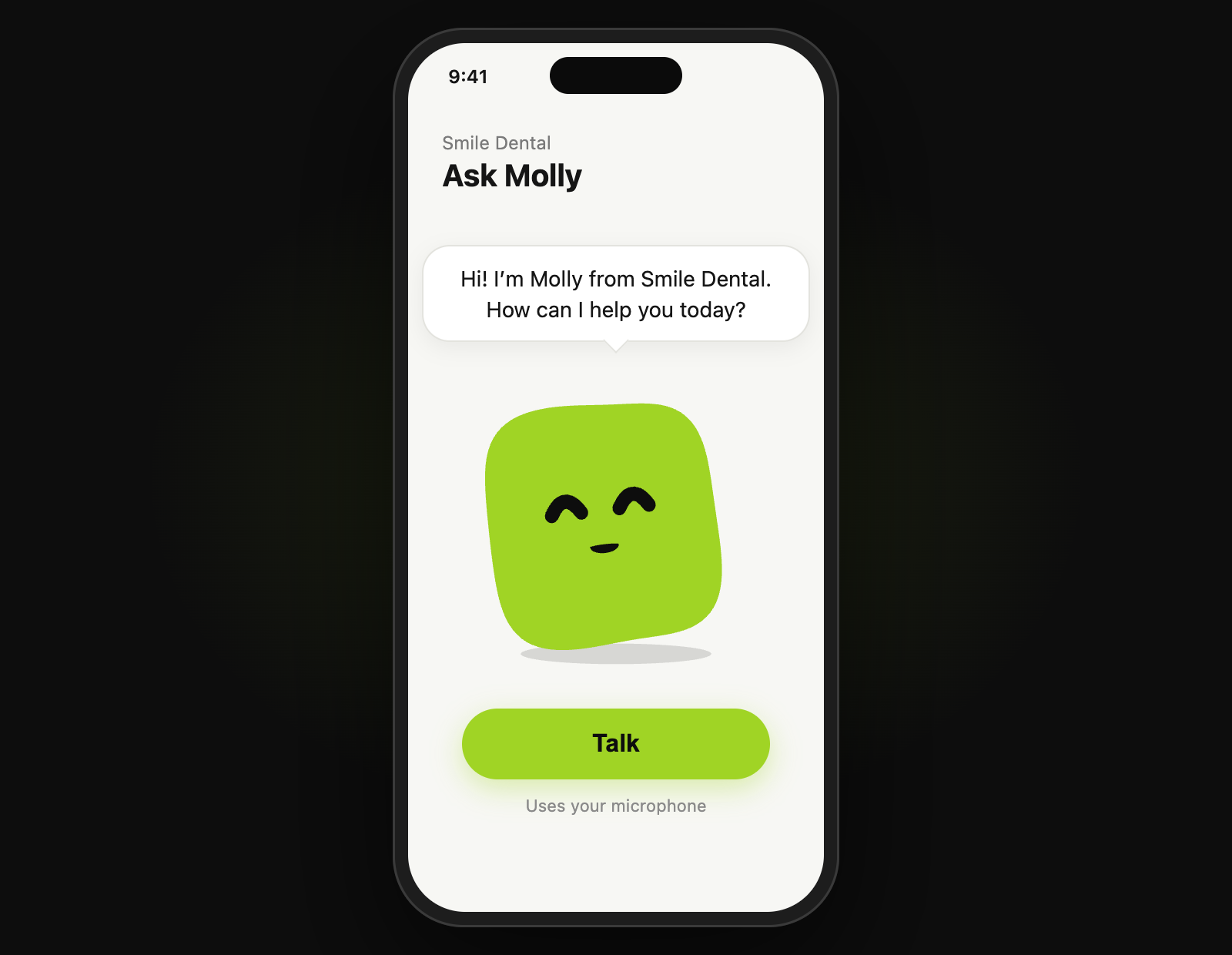
At the end of this guide your Flutter app shows your agent's mascot, the animated face every Wixzel Voice agent has, and it listens, thinks and talks along with a live call. The wixzel_voice_flutter package draws it with AgentMascotView and keeps it in step with the call with MascotRealtimeLink; the wixzel_voice Dart SDK carries the call. Expect about an hour, most of it wiring a recorder and a player. A session is billed like a phone call on the same engine: $0.0491 per connected minute on Gemini Live, about $0.20 for four minutes, with no phone line.
By Aqeel Shamsudheen · Published · Updated
- Takes
- About an hour
- Engine
- gemini-live
- Engine time
- $0.0491 per connected minute
What do you need before you start?
- A Wixzel Voice agent and an API key with credit, kept on your server. Any agent works: every agent has a mascot, starting with the default green one.
- Flutter 3.27 or newer.
- A server you control that can call the API. The example uses Node.js and the TypeScript SDK.
- A recording plugin that streams 16-bit PCM, ideally 8 kHz mono with echo cancellation, and a player that accepts raw PCM, such as
recordandflutter_pcm_sound.
How do you build this on Wixzel Voice, step by step?
01Add the packages
wixzel_voice_flutterdraws the mascot;wixzel_voiceis the Dart SDK it builds on:pubspec.yamldependencies: wixzel_voice: ^0.8.0 wixzel_voice_flutter: ^0.1.0 http: ^1.2.0The package depends on
sensors_plus, so the mascot's eyes can follow the phone's tilt, and onvisibility_detector, so it animates only while it is on screen. It does not record or play audio.02Give the app the agent and a session, from your server
Your API key never goes in the app. Your server fetches the agent and mints a one-minute, single-use session, and the app asks your server for both:
server.mjsimport express from 'express'; import { WixzelVoice } from 'wixzel-voice'; const wixzel = new WixzelVoice({ apiKey: process.env.WIXZEL_API_KEY }); const app = express(); const AGENT_ID = process.env.AGENT_ID; // Put your own sign-in check in front of both routes. app.get('/agent', async (req, res) => { res.json(await wixzel.agents.retrieve(AGENT_ID)); }); app.post('/session', async (req, res) => { res.json(await wixzel.realtime.createSession({ agent_id: AGENT_ID, max_duration_seconds: 300 })); }); app.listen(3000);The agent JSON carries
mascot.spec, the small spec the mascot is drawn from. Minting a session costs nothing; billing starts when the app connects.03Draw the mascot
Agent.fromJsonreads what your server sent, andAgentMascotViewdraws it:agent_face.dartimport 'dart:convert'; import 'package:flutter/widgets.dart'; import 'package:http/http.dart' as http; import 'package:wixzel_voice/wixzel_voice.dart'; import 'package:wixzel_voice_flutter/wixzel_voice_flutter.dart'; const backendUrl = 'https://api.example.com'; Future<Agent> loadAgent() async { final res = await http.get(Uri.parse('$backendUrl/agent')); return Agent.fromJson(jsonDecode(res.body) as Map<String, dynamic>); } Widget agentFace(Agent agent, MascotController controller) => AgentMascotView(agent: agent, controller: controller, size: 220); // In a list, draw one frame and run no animation: Widget agentRow(Agent agent) => AgentMascotView(agent: agent, size: 40, still: true);An agent with no spec gets the default look. A near-black or near-white mascot stands on a stage of its own colour, so it does not disappear into a dark or light screen; turn that off with
stage: false. A tap plays an expression, andMascotControllerplays moves by name, such asmascot.play('hello').04Link the mascot to a call
Connect with the Dart SDK's
RealtimeConnectionand hand it toMascotRealtimeLink. The link makes the mascot think while the call connects, wave hello, listen while the user talks, and move its mouth with the agent's audio:talk.dartimport 'dart:async'; import 'dart:convert'; import 'dart:typed_data'; import 'package:http/http.dart' as http; import 'package:wixzel_voice/wixzel_voice.dart'; import 'package:wixzel_voice_flutter/wixzel_voice_flutter.dart'; /// Your audio plugins, behind a small interface. abstract class PcmPlayer { void add(Int16List samples); // 16-bit PCM, 8 kHz mono void clear(); } class MascotCall { MascotCall(this.mascot, this.player); final MascotController mascot; final PcmPlayer player; RealtimeConnection? _conn; MascotRealtimeLink? _link; StreamSubscription<Int16List>? _mic; /// [micFrames] is 16-bit PCM at 8 kHz in 160-sample (20 ms) frames. Future<void> start(Stream<Int16List> micFrames) async { final res = await http.post(Uri.parse('https://api.example.com/session')); final session = RealtimeSession.fromJson(jsonDecode(res.body) as Map<String, dynamic>); final conn = RealtimeConnection.forSession(session); _conn = conn; _link = MascotRealtimeLink(mascot, conn); conn.events.listen((event) { switch (event) { case RealtimeAudio(:final mulaw): player.add(mulawToPcm16(mulaw)); // the mouth follows this audio through the link case RealtimeAudioClear(): player.clear(); // the user spoke over the agent case RealtimeEnded(): unawaited(end()); default: } }); await conn.ready; _mic = micFrames.listen((frame) { conn.sendAudio(pcm16ToMulaw(frame)); _link?.micAudio(frame); // it leans in while the user talks }); } Future<void> end() async { await _mic?.cancel(); await _link?.dispose(); // leaves the mascot idle; does not end the call await _conn?.end(); _mic = null; _link = null; _conn = null; } }Show it with
AgentMascotView(agent: agent, controller: mascot), the same controller the call drives. Dispose the controller when the screen goes away.Turn on the platform's echo cancellation in your recorder, or the agent hears itself through the speaker and interrupts itself.
05Make the lip-sync exact, if your player schedules audio
By default the link assumes your player starts each chunk about 120 ms after it arrives. If your player knows exactly when a chunk plays, tell the link instead:
exact_timing.dartimport 'dart:typed_data'; import 'package:wixzel_voice/wixzel_voice.dart'; import 'package:wixzel_voice_flutter/wixzel_voice_flutter.dart'; MascotRealtimeLink exactLink(MascotController mascot, RealtimeConnection conn) => MascotRealtimeLink(mascot, conn, estimatePlayback: false); // In your player, each time it schedules a chunk, on the player's own clock: void scheduled(MascotRealtimeLink link, Int16List pcm, double playAt, double now) { link.agentAudio(pcm, playAt: playAt, currentTime: now, sampleRate: 8000); }
What does this build cost on Wixzel Voice?
Engine time for 4-minute sessions on the gemini-live engine at $0.0491 per connected minute: about $0.20 per session. There is no telephony cost, because there is no phone line.
| Sessions per month | Connected minutes | Engine cost per month |
|---|---|---|
| 500 | 2,000 | $98.20 |
| 2,500 | 10,000 | $491 |
| 10,000 | 40,000 | $1,964 |
The packages are free and MIT licensed. Drawing a mascot costs nothing; only a live session spends credit, at the engine's per-minute price, per second, from your prepaid balance.
Prepaid, with no subscription and no free tier: add credit from $5 and usage spends it. Estimate your own mix.
Which Wixzel Voice limits apply to this build?
- The package does not record or play audio. Your app supplies both through plugins of its choice.
- Phone-quality audio: G.711 µ-law at 8 kHz in both directions.
- Sessions count toward the account's concurrent-call limit, five by default.
- Flutter 3.27 or newer. Tilt needs an accelerometer; without one the mascot looks around on its own.
- Changing a mascot's look is an API call from your server (
agents.updateMascot), not from the app, because it needs your API key.
Frequently asked questions
How do I show a Wixzel Voice agent's mascot in Flutter?
wixzel_voice and wixzel_voice_flutter to your pubspec, read the agent your server fetched with Agent.fromJson, and draw it with AgentMascotView(agent: agent). Pass a MascotController to drive it from code.How does the mascot lip-sync to the agent?
MascotRealtimeLink listens to the RealtimeConnection events and moves the mouth with the agent's audio, timed by its own estimate of your player's delay or, with estimatePlayback: false, by the times your player reports through agentAudio. It also sets the states: thinking while connecting, listening while the user talks, idle when the call ends.Does the mascot look the same as on the website?
Is there the same thing for web apps?
mountMascot from wixzel-voice/mascot (wixzel-voice 0.10.0 on npm) draws the mascot on a canvas, and face.connect(session) starts the realtime call with the mascot wired in, including the microphone and playback.Where to read more
- SDKsdocs
The Dart and TypeScript SDKs and the mascot widgets.
- Mascotsdocs
The spec, changing the look, and generating one from a website.
- Realtime: web and mobiledocs
Minting sessions, the protocol and billing.
About Wixzel Voice
Wixzel Voice is a voice AI API for building AI agents that place and answer real phone calls over your own SIP trunk, or talk to people in your web and mobile apps. One API key and one prepaid balance cover every voice engine, billed per second of actual usage.
More guides
Claude, in Claude Code or claude.ai, placing a real call over your SIP trunk and reading back the transcript, with a confirmation before anything dials.
Your existing Twilio number answered by an AI receptionist that books appointments into the API, built in Node.js.
Two phone agents, one speaking Hindi and one Malayalam, on Sarvam's Indian-language models, answering or placing calls over your SIP trunk.
A Flutter app where users talk to your voice agent over a WebSocket, with the API key kept on your server and no phone number involved.
A Gemini Live agent ringing a real phone over your SIP trunk from four cURL requests, and the call record with its transcript and cost.
A list of leads called by your agent over your SIP trunk, in batches sized to your concurrency limit, with every call's status and transcript read back.
A talking mascot in the corner of your website that visitors call from the browser, limited to your domains and your daily caps, with every caller listed.
Build your first voice agent